
TikTok Video Downloader by Keen Converters
Download public TikTok videos in high quality for offline viewing and personal use. Keen Converters provides a simple browser based TikTok video downloader designed for users who want quick access to videos they already own or have permission to use.
Download TikTok Videos
Paste a public TikTok video link below to generate a downloadable version.
Example: https://www.tiktok.com/@username/video/1234567890123456789
Processing your request...
Could not process the video. Please check the URL and try again.
Download Options
High quality output
Generate clean, high resolution video files suitable for offline viewing, editing, or archiving personal content.
Fast processing
Videos are processed quickly through optimized servers so you can save time without installing software.
Privacy focused
We do not store downloaded videos or collect personal data. All processing happens securely and temporarily.
Important Usage Note: This tool is intended for personal reference, educational use, and content you own or are authorized to reuse. Users are responsible for complying with TikTok’s terms of service and local copyright laws.
Why Choose Keen Converters TikTok Video Downloader?
Keen Converters is a popular TikTok video downloader that lets you save TikTok videos for free. No extra apps are needed—just use your browser and paste a valid video link into our TikTok downloader to quickly convert and download videos in MP4 format.
High quality video output
Fast and simple processing
Privacy focused design
No more complexity in post-editing and publishing
Completely free. save as many TikToks as you please.
No signup. Just open our site and input a link there.
Tiktok video downloader HD online
Save TikTok video also in mp3.
TikTok Downloader works on all browser and operating system.
Supported Formats and Compatibility: The TikTok video downloader supports commonly used video formats for easy playback across devices, including mobile phones, tablets, and desktop systems. Output options are designed for compatibility, quality, and ease of use.
Download TikTok videos on your mobile phone
To download a TikTok video on Android or iPhone, first open the TikTok app and find the video you want to save. On the video page, tap the Share button (the arrow icon) and select Copy Link.
Next, open Keen Converters Tiktok Video Downloader in your browser and paste the copied link into the input field at the top of the page.
Click the Download button to save the video in MP4 format directly to your device. The video is saved quickly and in high quality, ready for offline viewing.

TikTok Video Downloader For your PC
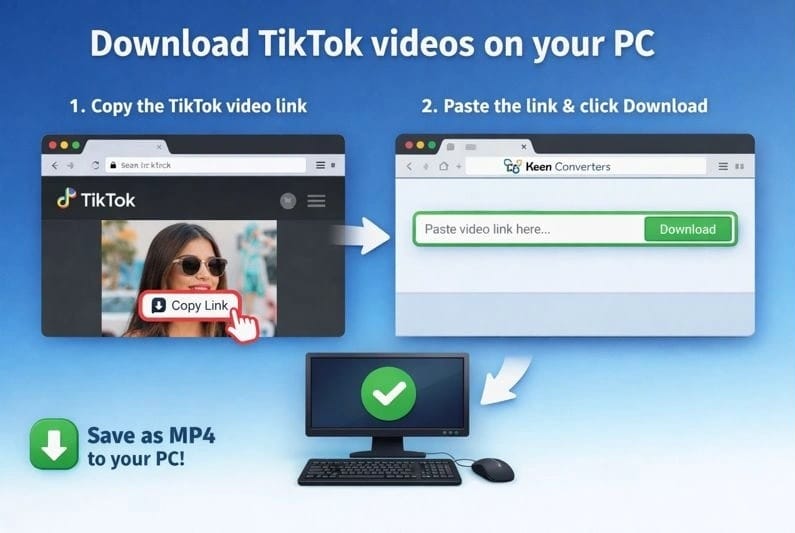
To download a TikTok video on a PC or laptop (Windows, macOS, or Linux), first copy the video link from the TikTok website.
Next, open Keen Converters Tiktok Video Downloader in your browser and paste the copied link into the input field on the main page.
Click the Download button, and the video will be saved in MP4 format. No additional apps or software are required, and the process works smoothly across all major operating systems.
Welcome to Keen Converters! We help you to easily download TikTok videos without watermark. Keen Converters allows you to keep your best TikTok clips in their true quality. This means no ugly watermarks to mess up your collection.
Our tool runs directly inside your internet browser. You do not have to install any extra programs. Keen Converters runs on every device, from computers to cell phones. It is quick and simple to download the videos you enjoy.
Discover how to keep your TikTok videos perfect using Keen Converters. Our tool is simple to try and removes watermarks, helping your videos look nice.
Key Highlights
- Keen Converters gives a simple way to download TikTok videos without watermarks.
- The website runs fully in your browser, so no extra software are needed.
- Keen Converters keeps the original video quality safe for a clean look.
- It works well on many devices like desktops, laptops, tablets, and mobile phones.
- Its easy design helps you download videos fast with minimal hassle.
What Keen Converters Is and Why We Use It to Save TikTok Content
Keen Converters is an easy tool that helps us download TikTok videos without watermarks. We can access it on any device using our internet browser.
Browser-based TikTok video saver that works with a simple link
Using Keen Converters is simple. Just copy and paste the TikTok video link into the tool. You do not have to install any software. It is great for everyone, no matter how good you are with technology.
Designed for watermark-free downloads when TikTok adds a logo
TikTok often adds its logo onto videos. This may feel annoying when you want to share or keep the videos clean. Keen Converters takes away these watermarks, so we can watch our TikTok videos without them.
Made for quick saving on mobile, PC, laptop, and tablet
Keen Converters works on every device, from smartphones to laptops. It is quick and simple to use, so we can save our favorite TikTok videos fast. No matter which device you use, Keen Converters makes saving videos easy.
Why People Rely on a TikTok Video Downloader in Daily Use
In today’s time, saving TikTok videos quickly is more important than before. A reliable TikTok video downloader is important for our everyday online work. It helps us save effort and download clear, high-quality videos.
When we need a free TikTok Video downloader for everyday use
Many people like to keep TikTok videos saved often. A free TikTok video downloader like Keen Converters makes it simple and free. It is great for regular and casual users, giving quality free always.
When we want to download TikTok video without watermark for cleaner sharing
Handling watermarks on TikTok videos can be frustrating. Watermarks may spoil the style of a video. Keen Converters helps us download tiktok videos without watermarks, making them nice for sharing or storing.
When we want HD quality and fast processing handled server-side
Quality really matters when watching and sharing videos. Keen Converters online gives HD quality and fast downloads. It handles everything on its servers, so you do not install anything. This means faster downloads and videos that look great on every device.
Key Features We Get with Keen Converters Online
Keen Converters shines as a great option for downloading TikTok videos. It is known for simple use and high-quality downloads. A major benefit is that it does not place watermarks, making videos look cleaner and smoother.
No watermark for better quality compared with many tools
Keen Converters is unique because it helps you save TikTok videos without watermarks. This makes the videos look nice and ready to share or use for other projects.
Always free service supported by ads and optional donations
Keen Converters is free to use because of ads. However, if you enjoy the service, you may donate. This helps Keen Converters continue providing its great TikTok video downloader without charging anyone.
Unlimited downloads with no stated download limit
Keen Converters also gives unlimited downloads. You can use it as often as you like without worrying about limits. This makes it simple to save as many TikTok videos as you want.
How We Download TikTok Videos Without Watermark Using a Link
Downloading TikTok videos using Keen Converters is simple and removes the watermark. This lets us watch and share videos without the annoying watermark. Here is how we do it.
Copy the TikTok video URL from Share → Copy Link
Start by opening TikTok and choosing the video you like. Tap Share and then Copy Link. This places the video link onto your clipboard.
Paste the link into Keen Converters Tiktok Video Downloader and click Download
Next, open Keen Converters TikTok Video Downloader. Paste the link inside the box and press Download. This begins the download of the TikTok video.
Choose the available download quality/format and save to our device
After pressing download, you will see choices for video quality and format. Choose what you prefer, and the video will save on your device. Now, you can enjoy it without the watermark.
How We Get the Correct TikTok Video Link
To download videos using Keen Converters, having the correct TikTok video link is important. It is simple to do in a few steps.
Start by opening the TikTok app and searching for the video you like. Next, tap the Share button, which looks like an arrow. Select Copy Link from the list. This save the video link on your clipboard.
It is important to copy the link the right way for an easy download with Keen Converters. Simply paste the URL into the TikTok video downloader online. After that, follow the next steps to save the video without a watermark.
When follow these steps closely, we can use Keen Converters in the best way. This helps us easily manage and save our favorite TikTok videos.
Where Our Downloaded TikTok Videos Are Saved on Each Device
Using Keen Converters to download TikTok videos helps us see where they are stored. The place where they end up depends on our phone and browser options. Let’s check the common folders and how we can switch them.
Default Downloads Folder on Desktop Browsers
On computers, such as Chrome, Safari, Firefox, and Edge, TikTok videos normally save in the default Downloads folder. This is the common place unless we have changed our browser to save files somewhere different.
Phone Storage and Gallery Behavior Depending on Browser Settings
Mobile users have other places for their saved files. TikTok videos downloaded with Keen Converters usually go into the phone storage and the photos app. This is based on our browser options and the phone model, either Android or iPhone.
How We Change the Destination in Browser Settings When Needed
Sometimes, we may wish to change where our saved files go. Here’s how to update this in our browsers:
- Open the browser settings or options menu.
- Go to the downloads area.
- Pick the option to change the default save place.
- Select the new folder where you want to save TikTok videos downloaded using Keen Converters.
These steps help us decide where to save TikTok videos, making our downloaded files easier to manage.
Supported Devices and Platforms for Downloading TikTok Videos
Keen Converters helps us quickly to download TikTok videos on many devices. You can try it on Android, iPhone/iPad, Windows, Mac, and tablets. This makes it easy to keep your favorite TikTok videos.
Android, iPhone/iPad, Windows/Mac, and Tablets via a Web Browser
Using Keen Converters is simple on Android, iPhone/iPad, or tablets via a web browser. Windows and Mac users can also use it without issues. Keen Converters performs smoothly across all these devices.
Using Keen Converters on PC Without Installing Software
Keen Converters runs online, so you do not need to install any software to your PC. This is perfect for people who prefer simple, easy tools. It makes downloading TikTok videos very easy.
Using Keen Converters on Mobile Without Adding Extra Apps
Using Keen Converters on mobile feels very simple too. You do not need any extra apps. Just open the Keen Converters in your browser to download TikTok videos. It is stress free.
Using Keen Converters on iPhone and iPad (iOS Download Considerations)
If you use Keen Converters on your iPhone or iPad, there are points to remember for easy downloads. Apple’s strong privacy rules may sometimes create issues, mainly with older iOS versions.
Why older iOS versions may block downloads due to Apple privacy policies
Older iOS versions may block you from downloading TikTok videos. This happens because Apple’s old systems follow tighter privacy rules. These rules may stand in the path of our attempts to download videos using Safari or other browsers.
Why updating iOS helps Safari download TikTok videos successfully
Updating your iOS to the newest version can make a huge difference. The more recent your iOS, the better it runs with apps and tools like Keen Converters. This helps Safari manage downloads easily, making it simpler to get videos without watermarks.
What we do when iPhone downloads still fail (browser and storage checks)
If downloads still fail after updating, review your browser settings and storage. Clearing your browser cache or adjusting Safari’s privacy options could solve the issue. Also, be sure you have enough storage space. iPhones often cannot download due to low storage space.
Quality Options and High-Resolution Downloads We Can Expect
When we download TikTok videos in high quality, Keen Converters offers us many quality options. We can choose from HD to the top resolutions. This helps our videos appear bright and clear on any platform.
HD and highest-available resolution links when detected
Using Keen Converters online, getting HD and top quality versions of TikTok videos feels simple. A trusted TikTok video downloader HD helps us save Tiktok videos with full clarity.
How file size changes with video quality choices
The size of downloaded videos depends on the resolution we pick. Higher-resolution videos take up more space. However, selecting high-resolution TikTok downloads makes our videos look much better.
Why watermark-free output improves perceived video clarity
Removing watermarks from TikTok videos helps them appear clearer. Without watermarks, our videos seem cleaner and more polished. Keen Converters online helps us remove watermarks easily and boost video quality.
Privacy, Anonymity, and Data Handling When We Use Keen Converters
At Keen Converters, we keep Keen Converters privacy as our top focus. We make sure you can download TikTok videos safely and without being noticed. Our process follows strict secure TikTok video downloader guidelines.
No video storage or retained copies; videos remain hosted on TikTok servers
Using Keen Converters means, no videos are stored by us. All content stays on TikTok’s servers. This keeps your information safe and private.
No tracking of user download history for anonymous usage
We care about your privacy. Keen Converters does not record what you download. This means you can download videos without others knowing. Your personal details remain safe with us.
No TikTok login required to download
We also protect your privacy by not asking for your TikTok login details. This makes Keen Converters a safe and secure TikTok video downloader for all users.
Browser Compatibility and “TikTok Downloader Online” Convenience
In today’s online world, tools like Keen Converters help us download TikTok content easily on many devices. Using a TikTok video downloader online allows us to save videos straight from our web browsers. This means we do not have to install any extra software.
Works through Common Browsers Like Chrome, Safari, Firefox, and Edge
Keen Converters works smoothly with major browsers like Google Chrome, Apple Safari, Mozilla Firefox, and Microsoft Edge. This broad support shows Keen Converters works well with the browsers we use most. It makes downloading TikTok videos simple and clear for everyone.
No Software Install Required Because Processing Happens on Keen Converters Side
Using Keen Converters is convenient because all video work happens on their servers. This means we do not need to install any software to our devices. With a TikTok downloader online, the whole process stays easy and quick.
Simple Workflow Built Around Copy/Paste and One-Click Download
Using Keen Converters is simple. Just copy the TikTok video link, paste it into Keen Converters, and press to download. This easy method shows how handy a TikTok downloader online is, especially with its strong browser compatibility.
Limits, Cost, and Monetization: What “Free” Means with Keen Converters Download
Using Keen Converters gives us access to a free TikTok video downloader service. This means we do not need to think about paying money. Keen Converters does not set limits on how many videos we can save. This gives us total freedom to save our favorite TikTok videos.
Keen Converters remains free because of a simple way to earn money. It shows ads and accepts optional support from users. This way helps Keen Converters keep the service free for all. It is one reason why many people choose Keen Converters for downloading TikTok videos.
Also, Keen Converters earning plan is built to last. It relies on ads and user support to keep the service running. This helps Keen Converters serve both daily and occasional users. So, when we search for a free TikTok video downloader, Keen Converters is a smart pick. It is both affordable and reliable.
Responsible Use, Intellectual Property, and What Keen Converters Provide and what Does Not Provide
Using a TikTok video downloader brings important responsibilities. Keen Converters makes it simple to download TikTok videos. Still, we need to remember a few important things.
Keen Converters is not affiliated with TikTok or ByteDance
First, Keen Converters works independently and is not connected to TikTok or ByteDance. This means Keen Converters lets us download TikTok videos, but it is not an official part of the TikTok platform.
It is a downloader, not a video editor—editing requires separate software
Even though Keen Converters is helpful for downloading videos, it does not include editing features. If we want to change or edit videos, we must use separate editing software. It is important to understand the difference between these kinds of tools.
MP3-only downloads are provided, we may don’t need third-party solutions
Also, Keen Converters let us download audio in MP3 format. If we want to take audio from a TikTok video, we don’t need other tools built for that job.
In short, knowing our responsibilities with TikTok video downloaders and Keen Converters features is important. This helps us use the tool properly, respect content ownership, and look for other tools when necessary.
Conclusion
Keen Converters is a popular option for downloading TikTok videos quickly. It provides downloads without watermarks, which is a great benefit. This helps saved videos appear cleaner and sharper, ideal for sharing or private use.
Keen Converters is also very adaptable. It works on many devices like Android phones, iPhones, PCs, and tablets. You do not need to install any software, which makes it simple to use. Plus, you can download as many videos as you like in high quality.
Our review proves Keen Converters is very convenient and useful. It is a strong choice for anyone who wants a trusted TikTok video downloader. It fits the needs of many users, making it a leading option for downloading videos quickly and in high quality.
There are no subscriptions or locked features. Our goal is to provide a reliable TikTok video download experience that stays accessible for everyone, just like our YouTube Video Downloader for video content from other platforms.
FAQ
What is Keen Converters and why should we use it to save TikTok content?
Keen Converters is a tool that helps you download TikTok videos without watermarks. It keeps the video quality equal to the original. You can use it on any device without installing extra software.
How do we rely on a TikTok video downloader like Keen Converters in our daily use?
Keen Converters is perfect for saving TikTok videos without watermarks. This helps your content stay clean when you share it. It also downloads videos quickly and smoothly.
What are the key features we get with Keen Converters online?
Keen Converters helps you download videos without watermarks.
It is free and shows few ads.You can save as many videos as you like without any limits.
How do we download TikTok videos without a watermark using a link?
First, copy the video link from TikTok. Then, paste it into Keen Converters. Pick the quality and format you prefer, and download the video to your device.
Where are our downloaded TikTok videos saved on each device?
On desktop computers, videos go into the Downloads folder. On mobile phones, they save in your storage and photo gallery. You can adjust where they save in your browser settings.
What devices and platforms support downloading TikTok videos with Keen Converters?
Keen Converters works on many devices and systems. This covers Android, iPhone/iPad, Windows, Mac, and tablets. You only need a web browser to use it.
What should iOS users consider when using Keen Converters?
iOS users may have trouble because of Apple’s privacy rules. Updating to the newest iOS version can fix it. If issues continue, review your browser settings and storage space.
What quality options and resolutions can we expect from Keen Converters downloads?
Keen Converters provides high quality downloads. You can select from various resolutions. This keeps your videos sharp and ready to share.
How does Keen Converters handle user privacy, anonymity, and data?
Keen Converters protects your privacy and identity by not saving videos. All content remains on TikTok servers. Keen Converters does not track your downloads or require a TikTok account login.
Which browsers are compatible with Keen Converters and why is it convenient?
Keen Converters works with browsers like Chrome, Safari, Firefox, and Edge. It’s easy to use because all processing happens on the server. You don’t need to install software.
Keen Converters works with browsers like Google Chrome, Apple Safari, Mozilla Firefox, and Microsoft Edge. It is simple to use since all processing takes place on the server. You do not need to install any software.
What are the limits, costs, and monetization strategies for Keen Converters?
Keen Converters is free to use and runs on ads and donations. It is a budget friendly way to download videos without limits. This shows Keen Converters dedication to users around the world.
What responsible use guidelines and limitations does Keen Converters have?
Users should follow copyright rules when using Keen Converters. It is only a downloader, not a video editor. Keen Converters also provide MP3 downloads. For extra features, you may need other third party tools.
Note: Keen Converters is an independent TikTok video downloader and is not connected with TikTok or ByteDance Ltd.. We offer an easy way to download TikTok videos without watermarks. Having issues with sites like TikMate, Tiktokio, or SSSTik? Try Keen Converters! Updated regularly for smooth and steady downloads.
About Keen Converters
Keen Converters allows users to safely download publicly available TikTok videos for offline viewing, personal use, education, or content analysis, while respecting privacy and restrictions. Our goal is to offer practical utilities that respect privacy, platform rules, and user trust. You can learn more about how we handle data in our Privacy Policy and the guidelines for using our services in our Terms and Condition.
All General Tools
- Free
- Free
- Free
- Free
- Free
- Free
- Free
- Free
- Free
- Free
- Free
- Free
- Free
- Free